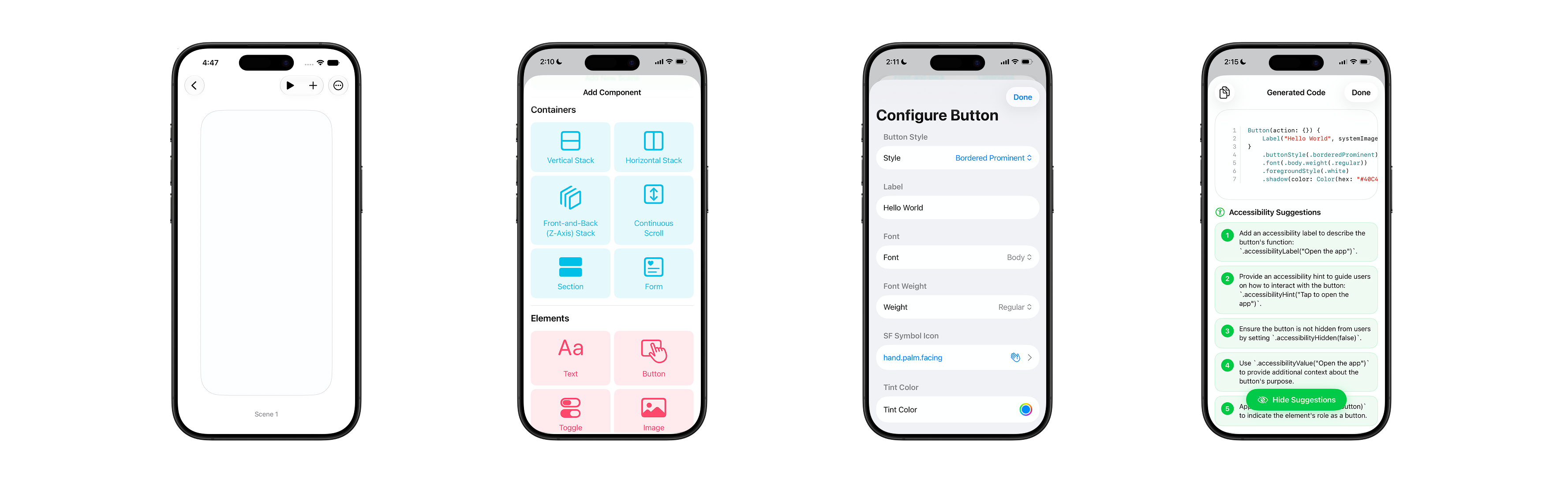
Interface Designer
Interface Designer is a design-first app that lets designers and students prototype iOS app ideas without writing code. It uses SwiftUI's native rendering to make prototypes fully interactive, behaving like a real native app — what you see is what you get.
Why?
Idea matters more than code. Even now, with generative AI, making an app isn't frictionless — you still need to know the right terms to describe what you want, or you end up going back and forth with the model, correcting and re-explaining. I learned to code myself, so I know how much time goes into just learning Xcode and Swift before you can even start building. That gap between having an idea and seeing it on screen feels unnecessarily long, and I don't think it needs to be.
How?
Instead of describing an idea to an AI and letting it guess what you mean, it made more sense to me to let people build it directly — the way you'd sketch something out. Figma already lets you wireframe how an app looks, but it doesn't really capture how it moves or feels. That's the part I wanted to solve for: a prototype that's actually interactive, close to how the real app would behave, not just a static mockup.
What?
I’ve developed Interface Designer, a native iOS app where you add SwiftUI elements to a canvas and interact with them directly. Since the prototype is rendered natively, what you build is what you get.
It also uses Apple's Foundation Model for two things:
- Suggesting accessibility improvements based on Apple's accessibility frameworks to help you make your app more accessible to everyone
- Converting the finished prototype into Swift code you can export to Xcode.
Key Challenges & Design Considerations
Designing for a small screen
Interface Designer is built natively for iOS/iPadOS, and that decision comes with its own advantage and constraints. Certain frameworks, such as UIKit which handles the app preview functionality is only available on iOS/iPadOS, not macOS. Hence, as separate implementation is required if we are to simulate an iPhone screen on macOS. More importantly, I wanted people to design and prototype for their target device on that device, not on a simulator, so they don't need to open a laptop just to make a fix.
Most design tools are built for desktop, where more screen space and a cursor allow for dense layouts and small buttons. On a phone, the interface has to simplify — larger text, more spacing — which means some functionality can't stay in plain view. The same trade-off shows up on this website: the navigation bar on desktop lists every page, but on mobile it collapses into a hamburger icon. The key is making sure there's still a visual cue pointing to what's hidden.
For a feature-dense app like this one, I worked through that trade-off by consolidating features — surfacing a button only when it's relevant to that point in the app's lifecycle, and combining steps that didn't need to be separate. I sketched out every intended feature and the UI wireframe before writing code, and expected that list to change as I built — it did, especially once I integrated Apple's Foundation Model.

Telling User Input Apart from App Input
Since Interface Designer lets people place UI elements identical to a real iOS app's, I had to draw a clear line between what belongs to the user's prototype and what belongs to the app itself — especially in full-screen preview mode, where there's no visual boundary between the two.
The clearest example: I use double-tap to exit preview mode, which means double-tap can never be available as a user-defined gesture — that would create a direct conflict. An exit button has the same problem: placed anywhere on the canvas, it risks overlapping the prototype's own UI, and placing it in the safe-area inset breaks the full-screen preview experience.
I solved this by moving the exit control off-screen entirely — using a Live Activity to surface an exit button in the iPhone's notification center. Swiping down reveals it without ever touching the canvas. I'm also looking at using the Action Button via Apple's App Intents as an alternative.